© 2025 Yaalo.All Rights Reserved

18 Dec 2025
eSIM technology is the most flexible and convenient means of connectivity throughout the world. Most iPhone and Android phone users want to switch to eSIM. But people don’t know how to activate eSIM on iPhone. There are multiple simple methods to set up eSIM on an iPhone. However, to avoid any issues, you need some essential things to consider, like embedded SIM activation requires a stable internet connection in some old iPhone versions.
In this article, I will go through the steps to activate eSIM on your iPhone and some considerations that will help you with a smooth setup.
Consider the following things before setting up eSIM.
You can easily activate eSIM on your iPhone via QR code scanning. But some carriers allow eSIM carrier activation or eSIM quick transfer. I am explaining these methods in detail to help you in choosing the best available option.
This method is used to set up eSIM from an older iPhone to a new one. You need to contact the carrier for a successful phone number transfer as well. It works in iPhone 16 and later models. The given steps will help you transfer your eSIM.
Once the users purchase an eSIM, the carrier assigns the eSIM to their iPhone. Before setting up an eSIM, you should contact your carrier and ask about eSIM carrier activation. Once the activation starts, you will receive a notification of the Carrier Cellular Plan To Be Installed.
Once you purchase eSIM from a provider like Yaalo eSIM, they will send you a QR, activation code, and SM-DP+ address to active eSIM on your iPhone or Android. You can follow the given steps to instantly set up your eSIM via QR code.
You can set up your eSIM on iPhone by manually entering the activation details. Note down the activation code separately for your convenience, then follow the given steps:
You can choose any of the methods according to your convenience. Mostly, eSIM users use the QR code method to set up eSIM on their devices.
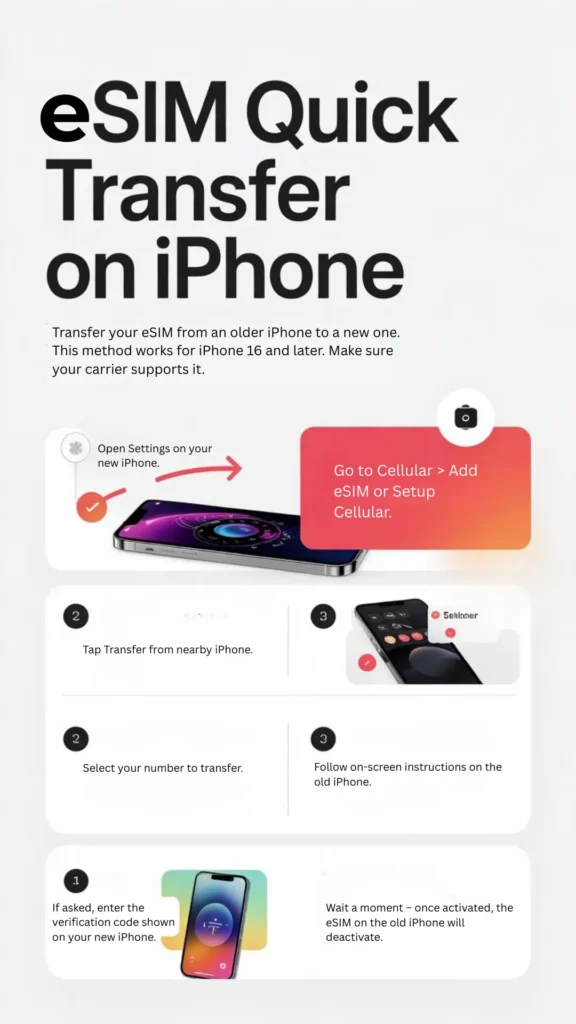 Tranafer eSIM from one iPhone to another iPhone
Sometimes, users set up eSIM in their devices, but it fails to activate in their destination countries. It may happen due to network issues, outdated iPhone software, or compatibility issues. The following steps can work to troubleshoot your iPhone eSIM activation glitches.
How to activate eSIM on iPhone? The most asked question from the new eSIM users. In this article, I have mentioned the easy steps to activate your eSIM. QR code and manual installation are the two commonly used methods. However, if you are transferring your eSIM from one iPhone to another, eSIM quick transfer will be the best option.
You can confirm it from your iPhone settings. Open settings, move to general, and then the About section. Scroll to the SIM section. If the IMEI is showing, your iPhone has eSIM.
It may be due to network issues, software glitches, carrier restrictions, or device compatibility problems. Troubleshooting these concerns can activate your eSIM.
iPhone XR, XS were the first iPhone eSIM compatible models. After that, iPhone 11, 12, 13, 14, 15, and later support eSIM technology.
4.9
Highly Rated
Based on 500,000+ customer reviews
Trusted worldwide
Over 1 million travelers across the globe have trusted us
Travel Friendly
No swaps, global connectivity ensured
With Yaalo, you can save 100% on roaming fees